Test your Plaid integration
Test our Plaid integration by reading data from Plaid's sandbox to a test company
When you've set up and enabled Plaid, you can test your integration with Plaid's sandbox. You'll need to:
- Set up a test companyCompany In Codat, a company represents your customer's business entity. Companies can have multiple connections to different data sources..
- Generate a LinkLink The authorization flow that allows end users to connect their accounting, banking, or commerce platforms to your application via Codat. URL to connect your test companyCompany In Codat, a company represents your customer's business entity. Companies can have multiple connections to different data sources. to Plaid's sandbox.
- Connect a test account.
Set up a test companyCompany In Codat, a company represents your customer's business entity. Companies can have multiple connections to different data sources.
- Go to the Codat Portal and sign in.
- Go to Companies.
- On the right side of the page, select Add new companyCompany In Codat, a company represents your customer's business entity. Companies can have multiple connections to different data sources..
- Enter a name for your test companyCompany In Codat, a company represents your customer's business entity. Companies can have multiple connections to different data sources. and select Add.
- Keep the Companies page open in a separate browser tab. You'll need it for the next stage of the process.
Generate a LinkLink The authorization flow that allows end users to connect their accounting, banking, or commerce platforms to your application via Codat. URL
To connect your test companyCompany In Codat, a company represents your customer's business entity. Companies can have multiple connections to different data sources. to Plaid's sandbox, you can either generate a LinkLink The authorization flow that allows end users to connect their accounting, banking, or commerce platforms to your application via Codat. URL from the Codat Portal or via the APIAPI A set of rules and protocols that allows different software applications to communicate with each other. Codat provides APIs for accessing financial data from accounting, banking, and commerce platforms..
Generate a LinkLink The authorization flow that allows end users to connect their accounting, banking, or commerce platforms to your application via Codat. URL from the Codat Portal
- On the Companies page, scroll down until you find the test companyCompany In Codat, a company represents your customer's business entity. Companies can have multiple connections to different data sources. that you created earlier.
- Next to the companyCompany In Codat, a company represents your customer's business entity. Companies can have multiple connections to different data sources. name, select Request data.
The LinksLink The authorization flow that allows end users to connect their accounting, banking, or commerce platforms to your application via Codat. URL... dialog box is displayed. - At the bottom of the dialog box, select Create.
- Copy the generated URL and go straight to Connect to Plaid's sandbox.
Generate a LinkLink The authorization flow that allows end users to connect their accounting, banking, or commerce platforms to your application via Codat. URL via the APIAPI A set of rules and protocols that allows different software applications to communicate with each other. Codat provides APIs for accessing financial data from accounting, banking, and commerce platforms.
- Open the
POST /companies/{companyId}/connectionsendpoint. - Replace
{companyId}with the ID of the test companyCompany In Codat, a company represents your customer's business entity. Companies can have multiple connections to different data sources. you've just set up. - In the body of the request, enter the platform key
plaid - Send your request.
Codat generates a unique linkLink The authorization flow that allows end users to connect their accounting, banking, or commerce platforms to your application via Codat. to Plaid's sandbox. For example:
{
  "id": "33f13646-e3f0-458a-b6ee-f5c1f38c1fdb",
  "integrationId": "580146ed-7556-4f92-8bf9-7344667763ec",
  "sourceId": "46ee0089-dc88-405a-9667-9fb3d9976f19",
  "platformName": "Plaid",
  "linkUrl": "https://link.codat.io/link/start/b8673b25-4444-0000-9906-0fecbfe4d2e3/33f13646-e3f0-458a-b6ee-f5c1f38c1fdb",
  "status": "PendingAuth"
}
When you move to a production environment, you'll supply a linkLink The authorization flow that allows end users to connect their accounting, banking, or commerce platforms to your application via Codat. URL to each customer. The linkLink The authorization flow that allows end users to connect their accounting, banking, or commerce platforms to your application via Codat. URL is the start of the authorization process that allows you to retrieve data from your customer's bank account.
Connect to Plaid's sandbox
For testing only, you'll follow the process that your customers normally use to authorize a connectionConnection A link between a Codat company and a data source (like an accounting platform). Each connection represents authorized access to pull or push data from that platform. to their bank account.
- Copy the linkUrl value into your browser, which takes you to Plaid's sandbox.
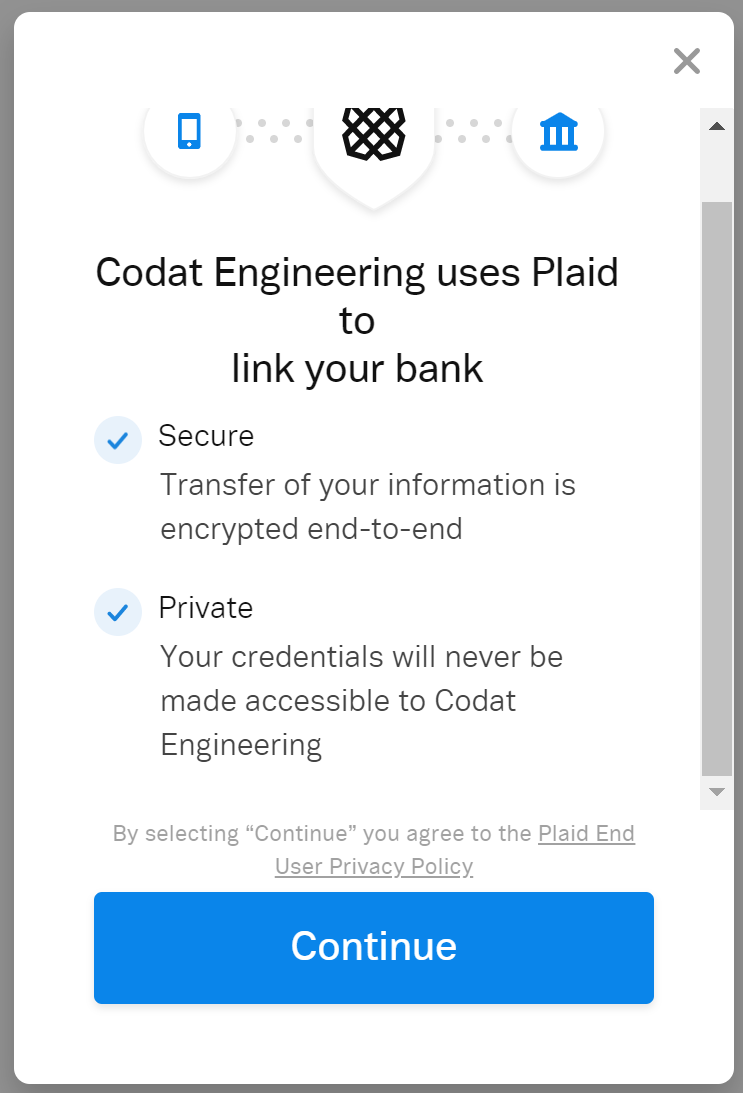
A message at the bottom of the screen confirms that you're in sandbox mode.
- Select Continue.
A dialog box shows a list of available bank accounts that have sample data for testing. This is Plaid's secure linkLink The authorization flow that allows end users to connect their accounting, banking, or commerce platforms to your application via Codat. site. - Select the bank account type you're interested in, or if it's not listed, search for it first.
- Select Continue to Bank Name.
You will either be directed to log in with sample test credentials or to authenticate for the sandbox. - Enter the test credentials or select Grant Access.
- Wait until a confirmation page is displayed.
You're now ready to start testing.
Check your banking data
You can check the data from the account you've linked to Plaid's sandbox in two ways: in the Codat Portal and through the Codat APIAPI A set of rules and protocols that allows different software applications to communicate with each other. Codat provides APIs for accessing financial data from accounting, banking, and commerce platforms..
To perform a quick check from the Codat Portal:
- On the navigation bar, select Companies, and search for the test companyCompany In Codat, a company represents your customer's business entity. Companies can have multiple connections to different data sources. that you created.
- Click the companyCompany In Codat, a company represents your customer's business entity. Companies can have multiple connections to different data sources. name.
- Select Banking APIAPI A set of rules and protocols that allows different software applications to communicate with each other. Codat provides APIs for accessing financial data from accounting, banking, and commerce platforms. in the side navigation menu.
- In the Data type dropdown, select New to show the new banking data types.
- Click Banking - Accounts to view accounts and related transaction data.
To retrieve account details from the APIAPI A set of rules and protocols that allows different software applications to communicate with each other. Codat provides APIs for accessing financial data from accounting, banking, and commerce platforms., use either of the following endpoints:
GET /companies/{companyId}/connections/{connectionId}/data/banking-accounts
GET /companies/{companyId}/connections/{connectionId}/data/banking-transactions