Track connection activity on your Portal dashboard

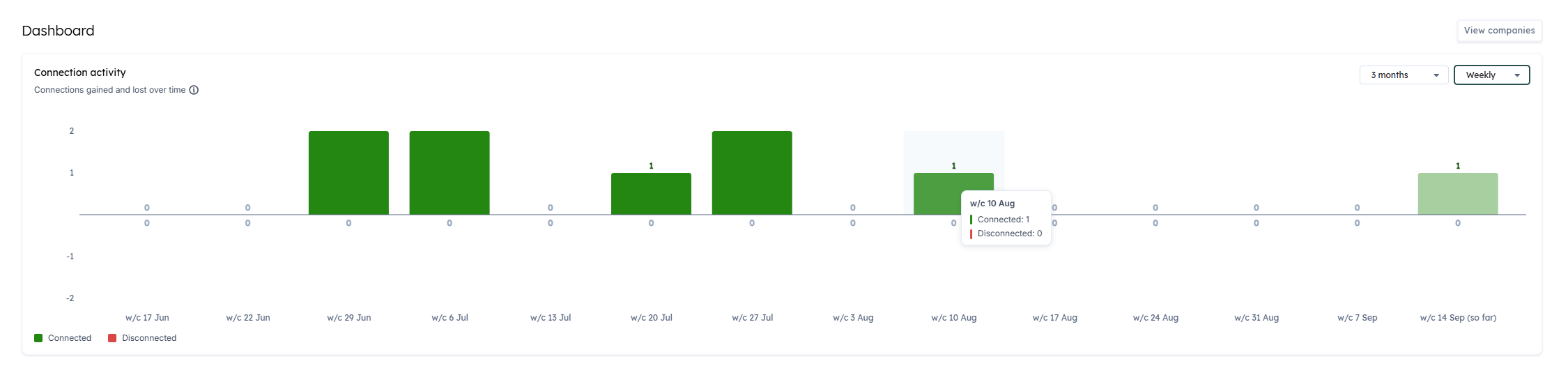
A new ConnectionConnection A link between a Codat company and a data source (like an accounting platform). Each connection represents authorized access to pull or push data from that platform. activity chart on your Portal dashboard shows how many companies connected and disconnected over time. Select any bar to open the Companies page filtered to exactly those companies.
What's new?
Your dashboard in the Codat Portal now leads with connectionConnection A link between a Codat company and a data source (like an accounting platform). Each connection represents authorized access to pull or push data from that platform. activity rather than companyCompany In Codat, a company represents your customer's business entity. Companies can have multiple connections to different data sources. creation. The new chart answers two questions in one place: how your connectionsConnection A link between a Codat company and a data source (like an accounting platform). Each connection represents authorized access to pull or push data from that platform. are trending, and which companies are behind the movement.
ConnectionsConnection A link between a Codat company and a data source (like an accounting platform). Each connection represents authorized access to pull or push data from that platform. gained and lost over time
The ConnectionConnection A link between a Codat company and a data source (like an accounting platform). Each connection represents authorized access to pull or push data from that platform. activity chart takes the place of the previous Companies chart at the top of the dashboard.
- Bars above the zero line show the companies that connected during the period, in green. Bars below it show the companies that disconnected, in red, whether they were deauthorized or unlinked. Net movement is visible at a glance.
- Use Range to look at the last 3 months, 6 months, 12 months, or all available data, and Granularity to switch between weekly and monthly buckets. The chart opens on the last 3 months by default, bucketed weekly, and remembers your choice for the restREST An architectural style for designing networked applications. Codat's APIs follow REST principles, using standard HTTP methods. of your session.
- Each bar is labelled with its count, and hovering a period shows a tooltip with both the connected and disconnected totals for that period.
- The period in progress is shown faded and marked (so far), so a partial week isn't mistaken for a drop in activity.
Connected and disconnected events are tracked from 7 May 2026.
The companies behind each bar
Select any part of the chart to see the companies it represents.
- Select a green segment to open the Companies page filtered to the companies that connected during that period. Select a red segment for the companies that disconnected.
- A banner above the Companies table confirms the filter that's applied, for example Showing companies that disconnected between 8 Sep 2026 and 14 Sep 2026, along with a Clear filter action to return to the full list.
Who is this relevant for?
This update is relevant for all clients who use the Codat Portal to monitor their companies. It's especially useful for implementation, support, and customer success teams who notice a change in connectionConnection A link between a Codat company and a data source (like an accounting platform). Each connection represents authorized access to pull or push data from that platform. activity and need the list of affected companies in order to act on it.
How to get started?
No action is required. Open the Codat Portal and the chart is on your dashboard.
- On the ConnectionConnection A link between a Codat company and a data source (like an accounting platform). Each connection represents authorized access to pull or push data from that platform. activity chart, set Range and Granularity to cover the period you're interested in.
- Hover a period to see its connected and disconnected totals.
- Select a bar segment, or the highlighted area above or below the zero line, to see the companies behind it.
- Review the filtered list on the Companies page, then select Clear filter to return to all companies.
For more detail on the Companies page and what each connectionConnection A link between a Codat company and a data source (like an accounting platform). Each connection represents authorized access to pull or push data from that platform. status means, see Manage existing companies.