Webhooks update: replay missed messages

You can now replay missed messages from the previous two weeks with this update to our webhooksWebhook An automated notification sent from Codat to your application when specific events occur, such as when data syncs complete or connections change status. service.
What's new?
Our webhooksWebhook An automated notification sent from Codat to your application when specific events occur, such as when data syncs complete or connections change status. service caches all generated events even if no consumers have been configured. With this latest update to the service, you can request Codat to resend all events missed in the previous two weeks. You can do so when you start using the webhooksWebhook An automated notification sent from Codat to your application when specific events occur, such as when data syncs complete or connections change status. service, on a consumer-by-consumer basis.
Who is this relevant for?
- Clients migrating to our new service who want to ensure no messages are lost during the migration process.
- Clients developing their solution with Codat who want to test that solution with genuine previously generated events.
How to get started?
You can use this functionality immediately if you are already using our new webhooksWebhook An automated notification sent from Codat to your application when specific events occur, such as when data syncs complete or connections change status. service. To replay missed events, follow these steps:
- Navigate to Settings > WebhooksWebhook An automated notification sent from Codat to your application when specific events occur, such as when data syncs complete or connections change status. > Configure consumers in the Codat Portal.
- Select an existing webhookWebhook An automated notification sent from Codat to your application when specific events occur, such as when data syncs complete or connections change status. consumer or create a new one.
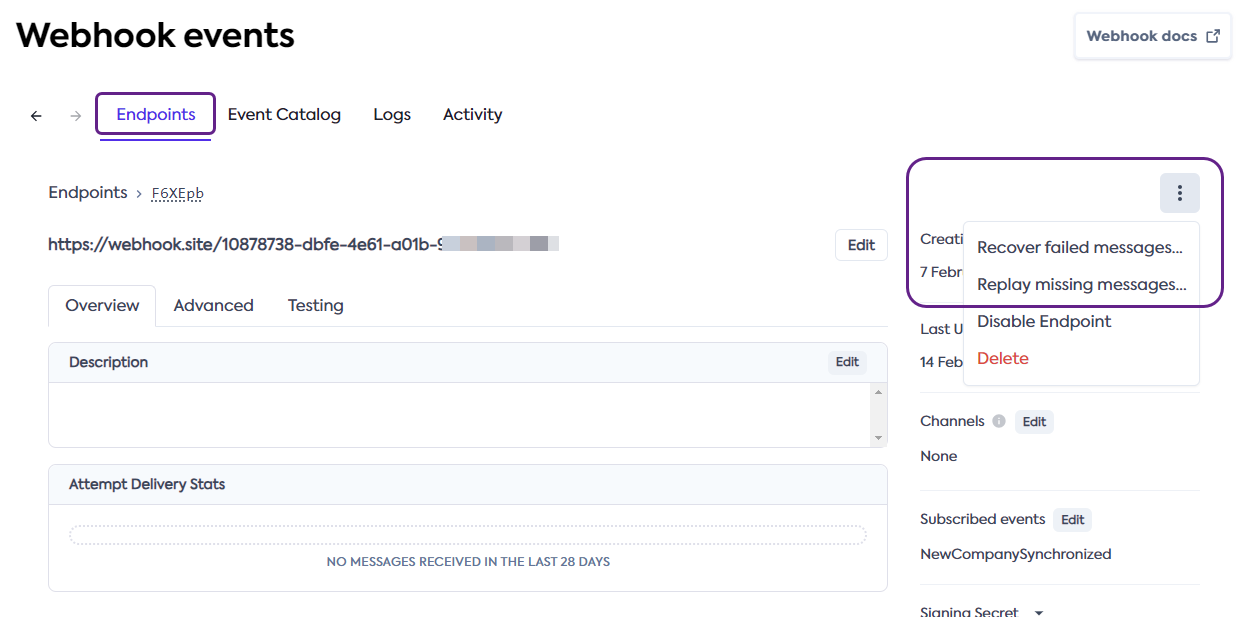
- In the detailed consumer view, click the click the triple-dot menu and select Replay missing messages.
- Select the starting date for the messages you wish to replay and confirm by pressing Replay.
Alternatively, you can scroll the consumer detail page to view the Message Attempts section and use the triple-dot menu to replay an individual message. See our detailed documentation on how to Recover failed and missed messages.